
What is WFP mode and how to enable it?
NetDetour supports two methods of intercepting network connections on Windows:
- LSP mode
- WFP mode
WFP mode uses the Windows Filtering Platform (available on Windows 8 and later) to intercept network connections at a lower level within the operating system. Compared to LSP mode, it can work with applications that do not expose traffic through the older Winsock architecture, including some games, sandboxed software (such as certain Microsoft Store applications), and security-restricted software, including some Windows components.
In NetDetour, WFP mode is marked as experimental and can be selected during installation:
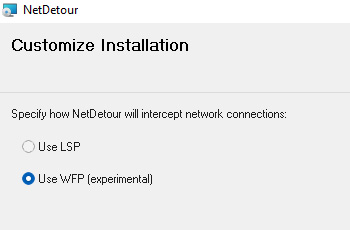
If you need compatibility with applications that do not work in LSP mode, reinstall NetDetour and select Use WFP (experimental) during setup.
Note that WFP mode is implemented using a WFP callout driver. To load on supported Windows versions, such drivers must be digitally signed by Microsoft (also referred to as cross-signing). Obtaining and maintaining these signatures has proven to be a time-consuming and occasionally challenging process.
For this reason, we currently include WFP mode only in selected NetDetour releases while we look for ways to streamline and make the signing process more sustainable.
The most recent version that includes WFP mode support is NetDetour v1.16, available here.
Was this article helpful?